
IE, aka the Bane of the Web, has struck again! This time with it’s own Microsoft products! (Okay “Bane of the Web” is maybe a bit much – just so frustrated with it right now.)
Just a quick note – if you are using the 64-bit version of IE (which should be “better”, no?), and you are encountering some issues with SharePoint, try switching back to the 32-bit version. You’ll be amazed as things just start working. (grumble… grumble.)
Recently I spent enough time trying to resolve this issue it was worth a blog posting. I was trying to open a Sharepoint 2010 site in Explorer. I could do this without any issue on laptop. However on my desktop, the option was greyed out. After some googling around, I hit on this answer at SharePoint Stack Exchange. (Thanks guys!)
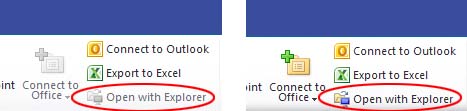
You may want to create a shortcut to the 32-bit version of IE on your desktop. You can generally find the 32-bit version at C:\Program Files(x86)\Internet Explorer\.
-JT

 Silverlight for some reason decided to take a Holiday during my Holiday. Ever eager to solve a technical issue during family events, I decided to start looking around for a solution. The installer package kept telling me I had a later version of Silverlight already installed. Very frustrating.
 Ecto started acting up on me lately. It may be because of new hardware, new version of WordPress, whatever. It’s just not a smooth as it once was. I’ve also been looking around and reading other reviews about blogging software on the Mac – and one term keeps resurfacing when it comes to Ecto: Abandonware.
You must be logged in to post a comment.